Product
RV Tech Pro
An end-to-end platform for mobile and shop-based RV repair businesses, from the customer request to the service history.
Built for
Mobile and shop-based RV repair businesses
What it does
RV Tech Pro runs the whole operation, not one slice of it. A customer submits a request on your website; it becomes a ticket, then a quote they can accept online, then a scheduled job. That job is then time calculated based on dispatch, arrival and departure times + parts. Invoices are generated automatically and sent directly to your preferred contact method.
Every step hands the previous step forward. Hours come from the timestamps a technician actually recorded, parts come off the shelf they were actually taken from, and the invoice is priced from both. Nothing is retyped between stages, which is where the numbers usually stop agreeing.
It covers a public site with service-request intake, tickets, quotes with online acceptance, scheduling and multi-technician dispatch, per-trip time tracking, job photos, multi-warehouse inventory with transfers and truck stock, invoicing with PDF and share links, payments and refunds, in-app and push notifications, and a role and permission matrix you can edit.
Built for mobile technicians and shop-based operations currently running the business across a scheduling tool, a spreadsheet, and a text-message thread.
How the work moves
One job, from the customer request to the service history.
Each step hands the previous step’s record forward. Nothing is retyped, and nothing is left in a text thread.
01
Website request
A customer describes the problem on your own site, in a structured form rather than a phone message someone has to transcribe.
02
Ticket
The request lands as a tracked ticket with an owner and a status, instead of an email sitting in a shared inbox. Where the work needs pricing first, the customer accepts a quote from a link before anything is scheduled.
03
Job
An approved ticket becomes a scheduled job, carrying the original request, the customer, the unit, and everything added since.
04
Dispatch
Work is assigned per technician rather than per job, so a two-person repair is two assignments, and each technician sees only their own queue.
05
Time, parts, and photos
Each technician records dispatch, arrival, and departure for every trip, parts come off the warehouse they were taken from, and photographs of the fault and the finished repair attach to the job.
06
Invoice
Labor comes from the timestamps recorded, parts from the stock consumed, plus travel and tax. The invoice is priced from the work actually done, so what happened and what was billed cannot drift apart.
07
Service history
The completed job stays linked to that unit, so the next visit starts with what happened last time rather than with a question.
In service
Running a working repair business, not a demonstration.
RV Tech Pro is the system Liberty RV LLC runs on. Their public site, and the service request that starts every job, are the front of the same platform described above.
Liberty RV LLC (opens in a new tab)
- Business
- Veteran-owned mobile RV repair
- Based
- Abbeville, South Carolina
- Works across
- The Abbeville and Greenwood corridor, into Anderson, Greenville, and Easley
- Repairs
- Water damage and rot, electrical and solar, appliances, slide-outs, leveling, interiors, and pre-purchase inspections
Their site takes service requests directly, and each one arrives as a ticket on the board rather than as an email somebody has to re-enter.
Capabilities
What is included, grouped by the part of the business it serves.
Intake
Requests come in from your own site
A customer describes the problem on your website, in a structured form with address lookup, rather than leaving a voicemail somebody has to transcribe.
Every request becomes a ticket with an owner
Tickets carry a status from new through to closed, and record whether they came from the web or from someone in the office.
The public form is not an open door
Automated submissions are filtered and repeat submissions from one address are limited, so the queue holds real requests.
Quotes
Quotes the customer accepts online
Send a quote by email and the customer opens it, reads it, and accepts or declines from a link. No account, no login, no phone tag.
Priced line by line before the work starts
Parts, services, labor, and fees each carry a quantity and a price, with tax, discount, and an expiry date on the quote.
Acceptance is recorded, not remembered
Who accepted and when is written down when it happens, alongside the version of the quote they were looking at.
An accepted quote becomes the job
The job is created from the quote and holds the agreed price, so the hours booked against it are tracked without changing what the customer was quoted.
Scheduling and dispatch
Scheduling that carries the request forward
A ticket converts to a scheduled job keeping its date, its customer, its unit, and everything added since it arrived.
More than one technician on a job
Work is assigned per technician rather than per job, which is what a two-person repair actually needs.
Six job states, so nobody has to guess
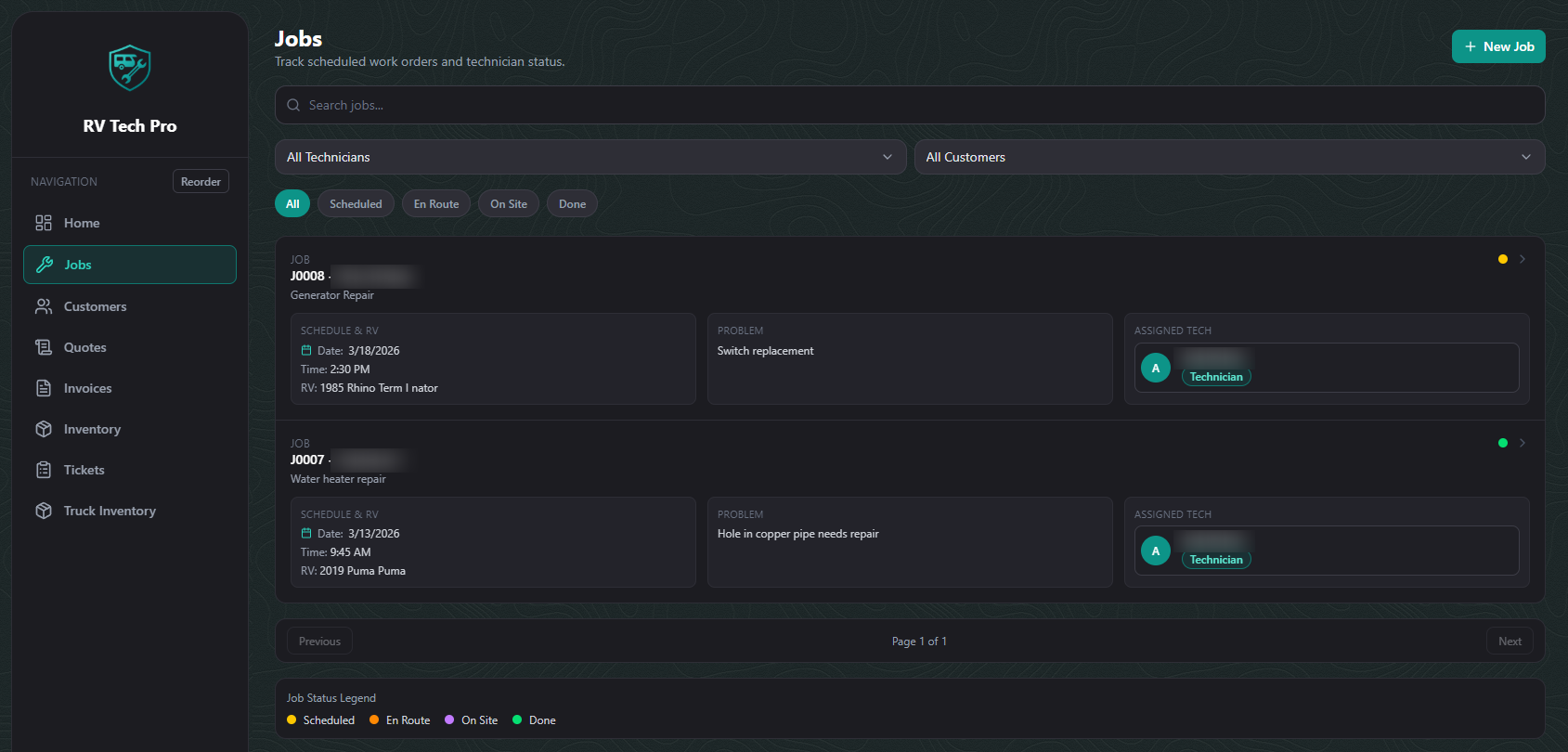
Scheduled, dispatched, arrived, in progress, completed, finished. The board shows where the work is without a phone call.
Field work
Dispatch, arrive, and depart, per trip
Each technician records their own timestamps, and a job that takes three visits records three of them rather than one blurred total.
Hours come from the clock, not from memory
Labor is calculated from the arrival and departure actually recorded, so what gets billed is what happened.
Photographs attached to the job
Evidence of the fault and of the finished repair sits on the record, where it settles a question months later.
Installs on a phone like an app
Technicians install it to the home screen, keep working when signal drops, and get pushed the jobs assigned to them.
Parts and inventory
Stock counted per warehouse, not in total
Quantities are held per location and per bin, with an alert when an item drops below the level you set.
Parts leave the shelf when they go on the job
Using a part on a job deducts it from the warehouse it came out of, so the count reflects the van, not last month.
Transfers that can be undone
Moving stock between locations is logged, and a transfer entered wrongly is reversed rather than quietly corrected.
Each technician sees their own truck
Technicians are scoped to the warehouses assigned to them, so a truck inventory is the stock on that truck.
Billing
The invoice is built from the job
Labor, parts, travel, and tax come from the work recorded, with discounts and net terms per customer, so the bill and the job cannot drift apart.
Sent as a PDF, a link, or both
Invoices go out by email, download as a PDF, and open on a read-only link for a customer who has lost the email.
Part payments, refunds, and receipts
Payments are recorded against the invoice as they arrive, including partial ones, with refunds and receipts handled in the same place.
Overdue invoices chase themselves
Reminders go out on the terms you set, without anyone keeping a list of who has not paid.
Operations
A permission matrix you can edit
Four roles and around thirty individual permissions, changed in the admin screen rather than by asking a developer.
Sign-in to suit the business
Passwords with optional two-factor and trusted devices, or single sign-on through a Microsoft work account.
Service history against the unit
Every job stays linked to the RV it was done on, so the next visit starts with what happened last time.
Notifications where people already look
Job, invoice, quote, and low-stock events reach staff and customers by email and push, from templates you control.
Next step
See RV Tech Pro against your own process.
A demonstration walks your actual workflow through the system rather than a generic tour.